
OldRoll is a vintage film camera app made for people who miss the warm colors, grain, light leaks, and imperfect charm of old photography. Instead of taking a normal phone picture and spending time editing it afterward, the app lets you choose a retro camera style and capture the effect directly.

Modern smartphones usually try to make every photo sharp, bright, and clean. This Android application takes a different approach. It gives digital photos the character of film photography, where softer details, faded colors, date stamps, and natural-looking grain can become part of the final image.
The app is especially useful for travel shots, street photography, portraits, café pictures, daily memories, and social media posts. Its simple controls also mean you do not need professional photography or editing experience to start experimenting with different looks.
The OldRoll APK file is around 191.7 MB, so users should check their available storage before downloading it. This guide covers how OldRoll works, its vintage camera experience, useful photography features, the installation process, creative ideas, and a few things worth knowing before using it.
What Is OldRoll APK?
OldRoll is an Android camera application designed to recreate the appearance and experience of traditional film photography. Rather than working like a full photo editor packed with complicated adjustment panels, it focuses mainly on capturing pictures with ready-made analog camera styles.
Different camera choices can give photographs their own mood. One may create warmer colors, another may produce stronger grain, while other options can give pictures a faded or disposable-camera appearance. This makes it easy to experiment without manually changing several editing settings.
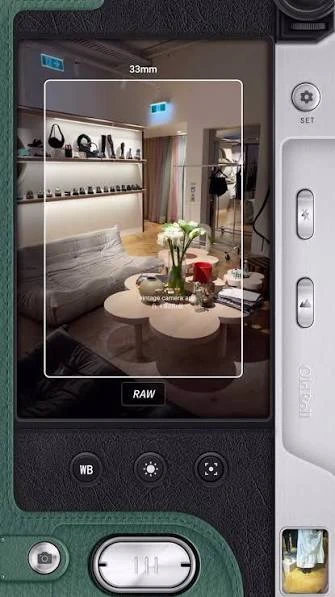
Another interesting part of the experience is its camera-inspired interface. The controls are designed to make taking a photograph feel a little closer to using an old camera rather than simply opening a standard smartphone camera.
If you enjoy improving photos beyond vintage effects, AirBrush is another useful app to explore. It focuses more on quick photo retouching, AI editing tools, filters, and easy adjustments, making it a good companion to the retro camera experience offered by this app.
A Camera App Built Around the Analog Look
What separates the OldRoll app from an ordinary mobile camera is the way it treats imperfections. Grain, unusual colors, faded areas, light effects, and date marks would normally be considered flaws in modern photography. Here, they are part of the style.
This approach can make simple scenes more interesting. A picture of a road, cup of coffee, old building, cloudy sky, or group of friends can feel quite different when captured through a film-inspired camera.
The app also removes much of the work involved in creating this appearance. Instead of opening another editor after taking every photograph, users can select the camera they like and shoot with its visual character already applied.
Features That Give OldRoll APK Its Vintage Character
The application brings together several photography features that are aimed at recreating an older visual style while keeping the actual shooting process convenient on a smartphone.
Different Retro Cameras
One of the main attractions is the selection of camera styles. Rather than relying on one universal vintage filter, users can experiment with different camera-inspired looks. Changing the camera can affect the mood, color treatment, grain, and overall appearance of a photograph.
Film-Like Colors
Old photographs often have colors that look noticeably different from modern smartphone images. OldRoll uses film-inspired processing to create warmer, softer, faded, or more distinctive color tones depending on the selected camera. These colors can work particularly well with outdoor scenes, portraits, sunsets, older buildings, and casual lifestyle photography.
Natural Grain
Digital cameras generally work hard to reduce visible noise. Film photography is different, and grain is often one of the details people associate most strongly with analog pictures. The Old Roll app can introduce a textured appearance that helps photos feel less digitally polished.
Date Stamp Effect
A visible date in the corner of a picture immediately brings back the appearance of photographs taken with older compact cameras. For users creating travel diaries, friendship albums, or collections of everyday memories, the date effect can also give photographs a simple chronological character.
Light Leak Effects
Traditional film could occasionally produce unexpected light marks when film was exposed to additional light. What was once an accidental result has become a popular visual effect. Plus, the application uses similar effects to add flashes, warm areas, or other imperfections that can make selected pictures feel more authentic and less digitally controlled.
Front and Rear Camera Support
Vintage styling does not have to be limited to scenery. Users can also experiment with selfies and portraits where supported, making the app suitable for both personal photography and everyday scenes.
Quick Sharing
Once a picture looks the way you want, it can be prepared for sharing without going through a lengthy editing process. This makes the app practical for users who create photos mainly for Instagram, stories, profiles, or other social platforms.
Taking Your First Vintage Photo With OldRoll Download
You do not need to understand film photography before using the app. Most of the creative work starts with choosing a camera style that matches the kind of picture you want.
A simple shooting process may look like this:
- Open the app on your Android phone.
- Browse the available camera choices.
- Pick a camera style you want to try.
- Frame the subject using the viewfinder.
- Check the lighting around your subject.
- Capture the photograph.
- Review the finished analog effect.
- Try another camera if you want a different mood.
- Save the picture you prefer.
- Share it directly when you are ready.
Trying the same scene with several cameras is a good way to understand the differences between them. After some practice, you will probably find a few styles that work particularly well for the type of photographs you normally take.
Choosing a Camera Style That Fits the Moment
Not every retro effect works equally well with every photograph. A strong vintage look may suit a night street scene but feel unnecessary on a bright portrait.
For people, softer tones can help create a relaxed and nostalgic appearance. Warmer styles often work nicely for cafés, sunsets, food, and travel pictures. Grainier looks can add character to streets, buildings, vehicles, and everyday city scenes.
The subject matters, but lighting matters too. Film-inspired effects often become more noticeable when a scene already contains interesting shadows, sunlight, lamps, reflections, or contrasting colors.
Creative Photos You Can Try With OldRoll Android APK
You do not need a special location to make vintage photography interesting. Ordinary surroundings often work surprisingly well because the retro processing changes their mood.
Some ideas worth trying include
- Street scenes during the evening
- Friends sitting at a café
- Old buildings and architecture
- Road-trip photographs
- Cars and motorcycles
- Sunlight coming through a window
- Cloudy landscapes
- Markets and busy streets
- Portraits taken near sunset
- Food and coffee photography
- Holiday memories
- Mirrors and reflections
- Night scenes with streetlights
- Everyday moments with family or friends
How to Download and Install OldRoll APK?
The photography app can be installed like other Android applications. Because the APK package is approximately 191.7 MB, make sure your device has enough free space for the download, installation, and saved photographs.
When installing an APK manually:
- Download the APK file from a source you trust.
- Wait until the 191.7 MB package finishes downloading.
- Open the downloaded file.
- Allow APK installation if Android requests permission.
- Select Install.
- Wait for Android to complete the process.
- Open the app after installation.
- Review camera, photo, and storage permissions.
- Grant only the permissions needed for the features you use.
- Select a camera and start taking photographs.
Android versions can handle external APK installation differently. On newer phones, permission is usually given to the particular browser or file manager being used rather than through one general unknown-sources option.
Permissions for OldRoll APK May Need
Camera permission allows the app to capture new photographs. Photo or media access may be needed when saving and working with images. Other permissions can depend on the app version and the features being used.
It is still sensible to review permission requests rather than approving everything automatically. A requested permission should have a reasonable connection to the feature you are trying to use.
Using OldRoll APK for Social Media Photos
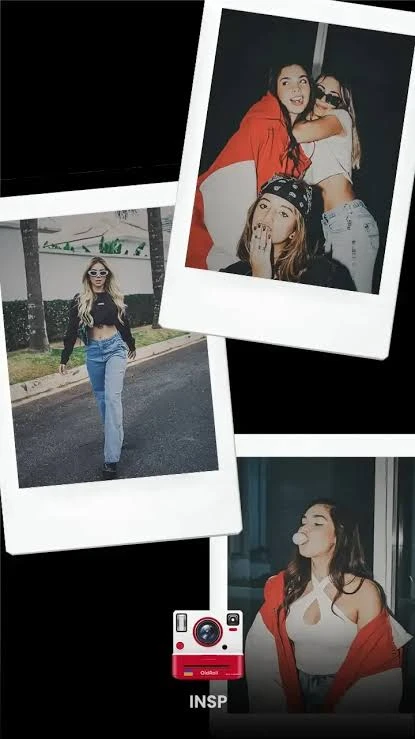
Retro photography works particularly well for social media because it can give several unrelated pictures a more consistent visual identity. For example, photographs from a day out may include food, streets, portraits, buildings, and scenery. Capturing them with similar film-inspired styles can make the collection feel more connected when posted together.
Moreover, the app also reduces the need to edit every image separately before posting. When you already like the result produced by the selected camera, the photograph may need little or no additional work. This can be useful for users who enjoy creating visually interesting posts but do not want to spend a long time adjusting sliders in a traditional photo editor.
Small Changes That Can Improve Your OldRoll APK Photos
The vintage effect handles much of the visual styling, but basic photography choices still have a major impact on the finished picture.
Try these simple habits:
- Use natural daylight whenever possible.
- Avoid covering the phone camera lens.
- Clean the lens before an important shot.
- Look for interesting shadows and reflections.
- Try shooting during sunrise or sunset.
- Keep the subject away from a distracting background.
- Test several camera styles on similar scenes.
- Avoid relying on heavy effects for every photograph.
- Keep original photos when they matter to you.
- Take several shots when capturing a moving subject.
A retro camera effect works best when it supports an already interesting photograph rather than trying to rescue a poorly composed one.
Where OldRoll APK Works Well and Its Possible Limits
The app has a clear purpose, which makes it appealing to users who specifically enjoy analog photography. At the same time, that focus means it will not replace every type of camera or editing application.
Useful points include:
- Multiple vintage camera experiences
- Film-inspired colors and textures
- Quick analog-style photography
- Easy controls for beginners
- Grain and retro visual effects
- Date-stamp aesthetics
- Creative options for portraits and everyday scenes
- Suitable results for social sharing
- Less need for manual editing
Things worth considering include:
- The APK file is around 191.7 MB.
- Some users may prefer cleaner modern photographs.
- Strong vintage effects will not suit every picture.
- Available cameras and features can vary by app version.
- Certain content or camera options may not be free.
- Saved photographs can gradually consume additional storage.
- Results still depend heavily on lighting and the original scene.
Common Old Roll APK Problems and Simple Checks
Camera apps depend on several phone features, so an occasional problem does not always mean the application itself is damaged.
Camera Does Not Open
Check Android settings and confirm that OldRoll has permission to use your camera. Close and reopen the application after changing the permission.
Photos Are Not Saving
Make sure your phone has enough available storage and that the application has the required photo or media access.
APK Will Not Install
Confirm that the entire APK file downloaded successfully. You should also check whether your Android version allows installation from the browser or file manager you are using.
Final Thoughts
In conclusion, OldRoll APK gives smartphone photography a deliberately older personality. Instead of chasing perfectly sharp and highly processed images, it lets users experiment with grain, retro colors, date stamps, light effects, and different analog-inspired cameras.
Its strongest appeal is how quickly an ordinary moment can take on a different mood. A street, portrait, café table, sunset, or weekend trip can feel more memorable when photographed through a carefully chosen vintage style.
FAQs
The APK file provided for this guide is approximately 191.7 MB.
Yes. Its camera-based approach makes it easy to experiment with vintage photography without learning advanced editing controls.
Yes. Different analog-inspired styles can be used creatively for portraits, selfies, travel pictures, and everyday photography.
That is the main purpose of the app. Its camera styles are designed to reproduce visual characteristics associated with vintage and analog photography.
Yes, you can download the app for free and enjoy its amazing features.
Leave a Comment