A good photo does not always need complicated editing. Sometimes adding a colorful filter, placing a cute sticker, fixing a small detail, or writing a short message is enough to give a picture a completely different feel. LINE Camera APK brings these simple creative tools together for Android users who enjoy editing photos directly on their phones.
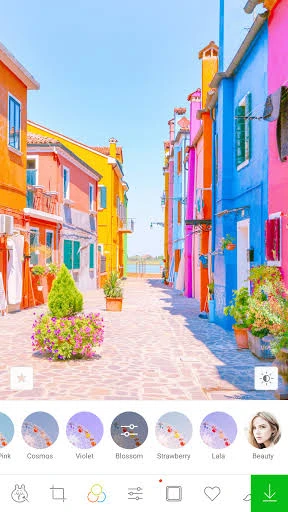
The application is especially focused on fun and personal editing. You can decorate selfies with stickers, experiment with different filters, add frames, write text, create collages, and use beauty tools to improve portraits. Existing pictures from your phone can also be edited, so you do not have to capture every photo through the app.
Another useful part of LINE Camera is its beginner-friendly approach. Most everyday edits can be made without learning complicated controls. This makes the app suitable for selfies, travel pictures, profile photos, social media content, special occasions, and everyday moments that could use a little more personality.
What Is LINE Camera APK?
LINE Camera Android is a mobile camera and photo-editing application that provides a collection of creative tools for customizing pictures. Android users can capture a new image or select an existing photo and then work on it using the available editing options.
Rather than concentrating only on technical image adjustments, the application gives considerable attention to decoration. Stickers, frames, filters, text styles, brushes, and collage layouts make it possible to change an ordinary image into something more colorful and expressive.
Portrait users also have editing options for selfies and facial photos. This combination of practical and decorative features means you can make a small correction to one picture and create a much more noticeable edit on another without switching applications.
If you enjoy giving photos a classic look, OldRoll APK is another camera app worth exploring. It recreates the feel of vintage film photography with retro camera styles, warm tones, natural-looking grain, and nostalgic effects that appear while capturing your photos.
Creative Features You Can Explore in LINE Camera APK
The photo editor provides different tools for different types of pictures. You do not have to use everything at once. Instead, you can choose individual features according to the photo you are editing and the result you want.
Stickers
Stickers are a major part of the LINE Camera experience. They allow users to place small decorative graphics over their photographs and give an otherwise simple picture more character. Depending on the content available in your version, you may come across different characters, expressions, shapes, symbols, and other designs. Once selected, a sticker can be positioned on a suitable part of the photograph.
Photo Filters
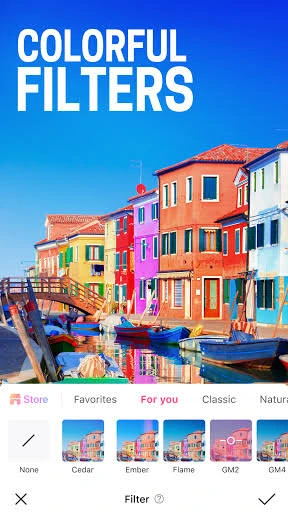
Filters provide one of the quickest ways to change the overall appearance of an image. Instead of adjusting several visual settings separately, you can try different filter styles and compare their effect on your picture. One filter might create a softer appearance, while another can make the colors or mood of a photograph feel noticeably different.
Beauty Editing
Selfies sometimes need only a small correction rather than a complete makeover. LINE Camera provides beauty-related options that can help users work on portraits and facial photographs. The available controls can be used to make subtle changes to the appearance of a portrait.
Frames
A decorative border can make a normal photo feel more complete, particularly when creating an image for a special occasion. The LINE Camera app also includes frames that can be placed around pictures. These can be useful for birthday photographs, travel memories, friendship pictures, greetings, and other images that need something beyond a simple crop or filter.
Text and Fonts
Sometimes the most important addition to a photo is not an effect but a few words. The text feature lets users write directly over an image. You might add someone’s name, a date, a short caption, a greeting, or a personal message.
Drawing Tools
Users who want something more personal can also draw over their photographs. Drawing and brush tools can be useful for adding simple marks, highlighting an object, creating small decorations, or writing something by hand. This gives users another way to customize a photo instead of relying entirely on ready-made effects.
Collage Maker
A single picture cannot always show an entire moment. The collage feature allows several photographs to be brought together into one layout. You can select pictures that belong together and arrange them within an available collage design. This works well for holidays, trips, birthdays, food pictures, family memories, before-and-after photos, and event highlights.
Turn Simple Photos Into Something More Personal
The best thing is that the LINE Camera Download becomes more interesting when different editing tools are used together carefully. For example, imagine you have taken a birthday picture. You could begin with a light filter, place a decorative frame around it, add a small sticker in an empty corner, and write a birthday message underneath.
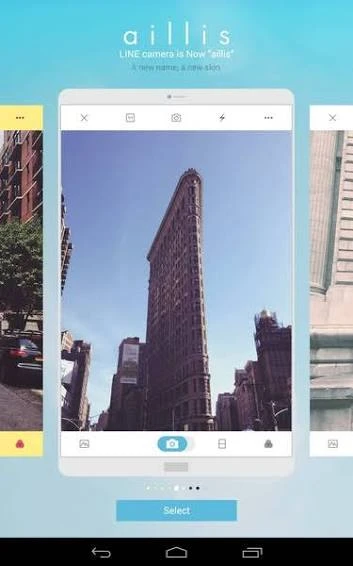
A travel photo might need something completely different. A crop and a suitable filter could be enough, while several pictures from the same trip could be placed into a collage. The important point is that every photo does not need the same editing style. LINE Camera gives you several options and leaves the creative decisions to you.
Make Selfies Look Better Without Overediting
With LINE Camera for Android, users can combine basic corrections with available beauty and filter options to give portraits a cleaner appearance.
A simple selfie-editing process may include:
- Choose a clear portrait from your gallery.
- Crop unnecessary space around the subject.
- Correct the overall appearance where necessary.
- Apply beauty adjustments lightly.
- Try a filter that matches the lighting.
- Add a small sticker or text if it suits the picture.
- Compare the result with the original.
- Save the photo when the edit looks balanced.
Decorate Pictures With Stickers, Text, and Frames
Stickers can add humor or personality, while text can explain a moment or turn a normal photograph into a greeting. Frames can then give the complete image a more finished appearance.
These tools can be useful for creating:
- Birthday greetings
- Friendship pictures
- Holiday memories
- Profile images
- Festival photos
- Social media posts
- Personal messages
- Fun selfies
However, adding too many decorative elements can hide the photograph itself. Leaving some empty space and keeping the main subject visible generally produces a cleaner design.
How to Download and Install LINE Camera APK?
Using an official application store is generally the easiest way to install a mobile application because updates and installation are handled through the device’s normal system.
On Android
- Open the Google Play Store.
- Search for LINE Camera.
- Check the application information.
- Select the correct app.
- Tap the Install button.
- Wait for the download to complete.
- Open the application.
- Review the requested permissions.
- Select or capture a photo to start editing.
Users who install a separately distributed Android application should be more careful about where the installation file comes from. Modified APK files from unknown websites can create privacy or security risks.
On iPhone and iPad
- Open the App Store.
- Search for the app.
- Select the correct application.
- Tap Get.
- Confirm the download when requested.
- Allow the installation to finish.
- Open the app.
- Review the initial settings and permissions.
Menus, features, and availability can differ depending on the operating system and current application version.
Understanding App Permissions
Camera permission, for example, may be necessary when you want to capture a picture from inside LINE Camera. Photo access may be required when importing an existing picture or saving your finished edit.
Rather than automatically accepting everything, read each request and consider whether it matches the feature you are using. Permissions can also be reviewed later through your phone’s application settings.
Free Features and Optional Content
Users can explore this photo editor app and its available editing options without needing professional photo-editing knowledge. However, not every sticker, decorative item, effect, or additional piece of content should be assumed to be permanently available for free. The selection can change as the application is updated, and some content or services may have separate conditions.
For this reason, check the information shown inside your current version before making a purchase or expecting a particular premium item. Casual users may only need a handful of filters, stickers, text options, and basic editing tools. People who decorate photos regularly may be more interested in exploring a wider range of available content.
Where LINE Camera Works Well and Where It Has Limits
The LINE Camera Free app is designed more around convenient and creative mobile editing than professional image manipulation. That brings several advantages, but it also means the application will not suit every type of editor.
| What Works Well | Things to Consider |
|---|---|
| Easy photo decoration | Not designed as advanced desktop editing software |
| Large focus on stickers | Too many decorations can make an image look crowded |
| Useful filters for quick changes | Strong filters may hide natural photo details |
| Beauty tools for portraits | Heavy adjustments can make selfies look unnatural |
| Text can be added to pictures | Text needs careful placement to remain readable |
| Frames help finish creative photos | Every frame will not suit every image |
| Collages combine several memories | Busy collages can become difficult to view |
| Beginner-friendly editing approach | Advanced users may want more detailed controls |
Simple Ways to Make Your Edits Look Better
Having more editing options does not mean every photo needs all of them. A few careful choices often produce a stronger image.
Try these habits while using this Android application:
- Start with the clearest original photo available.
- Crop unnecessary areas before decorating.
- Correct the overall image before applying strong effects.
- Test several filters instead of choosing the first one.
- Keep beauty adjustments subtle on portraits.
- Place stickers away from important facial details.
- Use text that remains easy to read.
- Avoid filling every empty area with decoration.
- Keep collages visually balanced.
- Compare your edited photo with the original.
- Save an untouched copy of important pictures.
- Review the complete image before exporting it.
Useful Ideas for Different Types of Photos
Different pictures benefit from different editing choices. Using the same filter, frame, and sticker combination repeatedly can make your photos feel too similar.
| Photo Type | Editing Ideas |
|---|---|
| Selfie | Light beauty adjustments and a soft filter |
| Birthday photo | Frame, greeting text, and a few stickers |
| Travel picture | Crop, color filter, and location text |
| Friendship photo | Fun stickers and a short caption |
| Food picture | Light visual adjustment with minimal decoration |
| Family memory | Simple frame and date |
| Profile photo | Clean crop with subtle adjustments |
| Event collection | Combine several photos into a collage |
Common Problems and Quick Fixes
Most problems with a camera or photo editor are worth checking at the device level before removing the application.
Photos Do Not Appear
Check whether LINE Camera has permission to access the photos or media stored on your device. Permission settings can normally be reviewed from Android’s application settings.
Camera Does Not Open
Make sure camera access is enabled for the application. You can also close other applications that may currently be using the camera and try again.
Edited Photo Does Not Save
Check available device storage and confirm that it has the necessary access to save photos. Very low storage can also cause problems with other applications.
App Runs Slowly
Large images and multiple effects may require more processing. Close unnecessary background apps and make sure enough storage remains available on the phone.
APK Does Not Install
A separately downloaded APK can fail because of an incomplete download, device incompatibility, security settings, or a damaged installation package. Avoid repeatedly downloading different modified versions from unknown sources.
Final Thoughts
No doubt about that, the LINE Camera APK takes a more playful approach to mobile photo editing. Instead of filling the screen with complicated professional controls, it gives everyday users practical ways to change and decorate their pictures.
Stickers are one of its most recognizable attractions, but they are only part of the experience. Filters can change the mood of a photograph, beauty tools can help with portraits, frames can finish a design, text can add meaning, and collages can bring several moments together.
FAQs
Yes. Filters allow users to quickly experiment with different visual styles without manually changing every image setting.
Yes. Stickers are an important part of its creative editing experience, although the exact collection available may change over time.
Yes. Its portrait, filter, beauty, sticker, text, and other creative tools can be useful when editing selfies.
The application provides collage-related tools for bringing multiple photographs together in one layout.
Yes. Available frames can be used to decorate the outer area of a photograph and create a more finished design.
Leave a Comment